Rates & availability
Availability & stop-sell
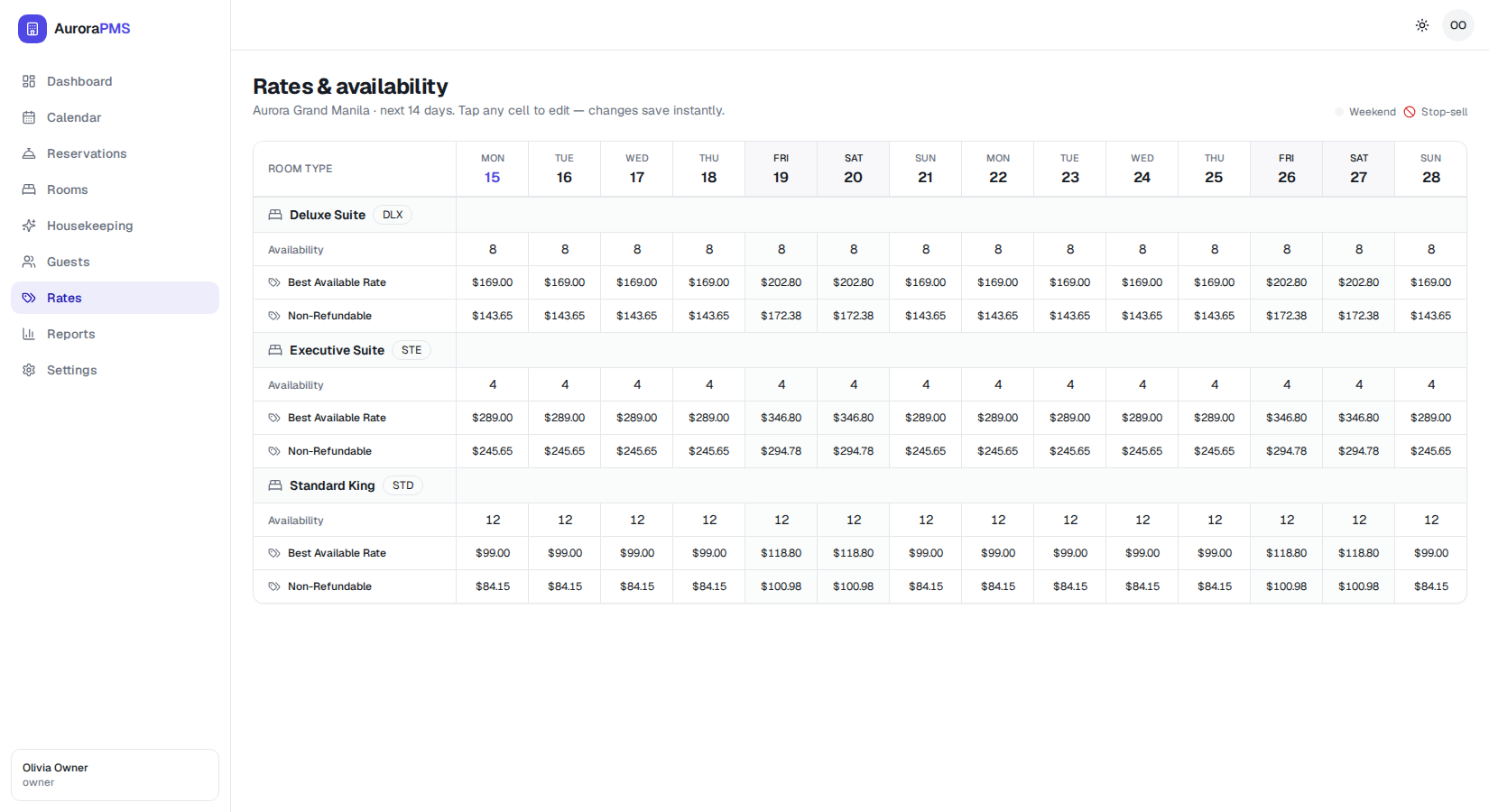
Control how many rooms are bookable on each date and close dates entirely when you need to. Availability lives right alongside your rates, so one screen runs your whole sell strategy.
How inventory works
Each room type has a pool of rooms. The Availability row in the rate grid shows how many of those rooms are still free to sell on each date. As reservations come in — from your booking engine or any connected channel — Aurora reduces availability in real time, so the same room can never be sold twice.
- 🛏️ Availability counts down as bookings arrive and counts back up on cancellations.
- 🔁 Real-time sync keeps your channels matched, which is what prevents overbookings.
- ✋ A manual override lets you hold rooms back (for maintenance or VIP holds) without deleting them.
Edit availability for a date
- 1Open Rates. Click Rates in the sidebar to see the grid with the Availability row for each room type.
- 2Tap the availability cell. Click the number under the date you want to change for that room type.
- 3Enter the new count. Type how many rooms should be bookable, for example reduce a count to hold rooms back for a group.
- 4Press Enter to save. The new count is live immediately and syncs to every connected channel.
Stop-sell: close dates completely
A stop-sell closes a date so no new bookings can be taken — useful for a full house, a private buyout, or renovation. The grid marks stopped dates with the stop-sell indicator shown in the legend at the top right.
- 1Pick the date and room type. Decide which room type and date you want to close.
- 2Apply the stop-sell. Set its availability to zero or toggle the stop-sell on that cell to block new sales.
- 3Confirm it is closed. The cell shows the stop-sell marker, so staff know at a glance the date is closed.
- 4Reopen when ready. Raise availability above zero again, or clear the stop-sell, to start selling the date once more.
A stop-sell only blocks new reservations. Guests already booked for that date keep their reservation and can still check in normally.
The chosen dates show their correct bookable count, and any stopped dates are closed everywhere — your booking engine and connected channels stop offering those nights within moments.